What happens when your phone has zero bars-and help is 200 miles away?
In remote areas, satellite communication devices are not gadgets; they are lifelines for navigation, emergency response, fieldwork, and staying connected beyond cellular coverage.
Choosing the best device means weighing more than price: coverage, battery life, durability, messaging options, SOS features, subscription costs, and how well it performs in harsh terrain.
This guide breaks down what truly matters so you can pick a satellite communicator that fits your route, risk level, budget, and mission.
What Defines a Reliable Satellite Communication Device for Remote Areas?
A reliable satellite communication device is not just the one with the strongest signal on the product page. In remote areas, reliability means the device can connect quickly, survive rough handling, manage battery life efficiently, and support the type of communication you actually need, whether that is SOS messaging, two-way texting, GPS tracking, voice calls, or broadband internet access.
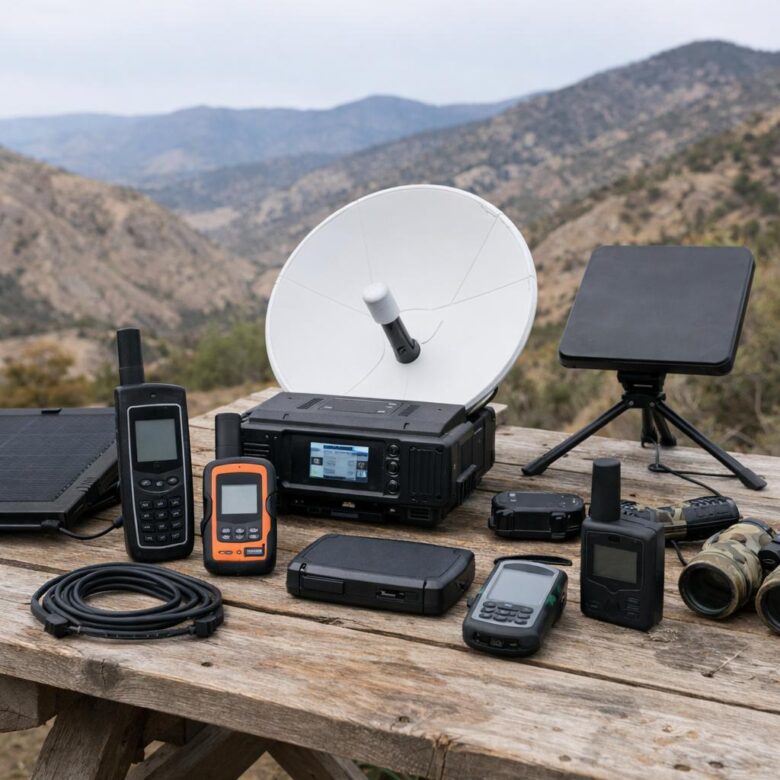
For example, a solo hiker in the Rockies may only need a compact satellite messenger like Garmin inReach for emergency alerts and location sharing, while a field engineering crew may require a satellite internet terminal such as Starlink Roam to upload reports, access cloud tools, and coordinate logistics. The right choice depends on coverage, subscription cost, data limits, portability, and how often the device will be used.
- Network coverage: Check whether the device uses Iridium, Inmarsat, Globalstar, or another satellite network, because coverage varies by region.
- Power performance: Look for long standby time, USB-C charging, solar charging compatibility, and replaceable battery options for extended trips.
- Emergency features: Prioritize SOS monitoring, GPS coordinates, weather alerts, and two-way confirmation instead of one-way distress signals only.
In real-world use, small details matter. A device with an intuitive app, durable waterproof rating, glove-friendly buttons, and clear service plans can be more valuable than a cheaper model with hidden activation fees or poor customer support. Before buying, compare the hardware price, monthly satellite communication service cost, cancellation terms, and whether international roaming is included.
How to Match Satellite Devices to Coverage, Power, Data, and Field Conditions
Start with coverage, not the device. A satellite phone or satellite hotspot that works well in open desert may struggle in steep valleys, dense forest, or polar routes, so check the provider’s coverage map before comparing satellite communication device cost, data plans, or accessories. For example, a field geologist working in northern Canada may prioritize Iridium coverage, while a sailing crew may compare marine satellite internet services with weather-routing needs.
Next, match the device to your real data requirements. If you only need emergency SOS, GPS tracking, and short text updates, a compact messenger like Garmin inReach can be more practical than a full satellite internet terminal. If you need email attachments, cloud reporting, telemedicine support, or remote camera uploads, look at higher-bandwidth satellite broadband equipment and monthly service plans.
- Low data: SOS alerts, GPS location sharing, short messaging, expedition check-ins.
- Medium data: email, basic forms, weather files, small image uploads.
- High data: video calls, remote monitoring, mapping software, team connectivity.
Power is often the hidden deal-breaker. In the field, I’ve seen teams carry excellent satellite devices but fail because they underestimated charging needs in cold weather. Check battery life, USB-C charging, solar panel compatibility, spare battery options, and whether the device can operate while connected to an external power bank.
Finally, consider field conditions: rain, dust, gloves, mounting options, antenna visibility, and how fast the device connects after being powered on. For harsh worksites, disaster response, mining camps, or offshore operations, rugged design and reliable satellite airtime support may matter more than the cheapest upfront price.
Common Buying Mistakes That Lead to Poor Remote Connectivity
One of the biggest mistakes is buying a satellite communication device based only on the hardware price. A low-cost satellite messenger may look attractive, but the real cost often sits in the data plan, activation fees, international coverage, and overage charges. Always compare the total monthly service cost, not just the device cost.
Another common issue is choosing the wrong network for the terrain. For example, a mining team working in a canyon may struggle with poor satellite visibility even with a premium device, while a marine crew in open water may get excellent performance from the same system. Coverage maps from providers like Starlink, Iridium, and Inmarsat should be checked before purchase, not after deployment.
- Ignoring antenna requirements: Some satellite internet terminals need a clear sky view and proper mounting to avoid signal drops.
- Overestimating bandwidth: A satellite phone is fine for emergency calls, but it is not built for video meetings, cloud backups, or large file transfers.
- Skipping power planning: Remote connectivity fails quickly if solar panels, battery banks, or vehicle chargers are not part of the setup.
I’ve seen field teams buy rugged satellite devices and still lose communication because they tested them only near the office. A simple pre-trip test in similar terrain can reveal weak signal zones, slow data speeds, and mounting problems before they become expensive safety risks.
Summary of Recommendations
Choosing the right satellite communication device comes down to matching capability with real-world risk. Do not buy the most advanced option by default; choose the one that fits your location, travel pattern, power access, budget, and emergency needs.
- Pick a satellite phone for regular voice communication.
- Choose a messenger for lightweight tracking and SOS support.
- Use a broadband terminal when data access is mission-critical.
The best decision is the device you can operate confidently under pressure. Test it before departure, understand its coverage limits, and keep it powered, protected, and ready.